入门
启动新仓库
git init
克隆现有仓库
git clone <url>
配置用户信息
git config --global user.name "Your Name"
git config --global user.email "email@example.com"
准备提交
检查当前文件状态
git status
添加未追踪的文件或未暂存的更改
git add <file>
添加所有未追踪的文件和未暂存的更改
git add .
交互式选择要暂存的文件部分
git add -p
移动文件
git mv <old> <new>
删除文件
git rm <file>
告知 Git 忽略某个文件(不从硬盘删除)
git rm --cached <file>
取消暂存某个文件
git reset <file>
取消所有暂存
git reset
查看你添加的内容
git status
进行提交
进行提交(并打开文本编辑器填写备注)
git commit
进行提交
git commit -m 'message'
提交所有未暂存的更改
git commit -am 'message'
切换分支
切换分支
git switch <name> 或 git checkout <name>
创建分支
git switch -c <name> 或 git checkout -b <name>
列出分支
git branch
按最近提交时间排序显示分支
git branch --sort=-committerdate
删除分支
git branch -d <name>
强制删除分支
git branch -D <name>
比较暂存区/未暂存的更改
比较所有已暂存和未暂存的更改
git diff HEAD
仅比较已暂存的更改
git diff --staged
仅比较未暂存的更改
git diff
比较提交
显示某次提交与父提交之间的差异
git show <commit>
比较两次提交
git diff <commit> <commit>
比较自某次提交以来单个文件的差异
git diff <commit> <file>
显示差异摘要
git diff <commit> --stat git show <commit> --stat
引用提交的方式
每次提到 <commit> 时,你可以使用以下任意一种:
分支名
main
标签名
v0.1
提交哈希 ID
3e887ab
远程分支
origin/main
当前提交
HEAD
3 次提交之前
HEAD^^^ 或 HEAD~3
丢弃更改
删除单个文件未暂存的更改
git restore <file> 或 git checkout <file>
删除单个文件所有已暂存和未暂存的更改
git restore --staged --worktree <file> 或 git checkout HEAD <file>
删除所有已暂存和未暂存的更改
git reset --hard
删除未追踪的文件
git clean
“储藏(Stash)”所有已暂存和未暂存的更改
git stash
编辑历史
“撤销”最近一次提交(保留工作目录中的更改)
git reset HEAD^
将最近 5 次提交压缩为一次
git rebase -i HEAD~6
然后在编辑器中将想与前一次合并的提交前的 “pick” 改为 “fixup”
撤销错误的变基(rebase)
git reflog BRANCHNAME
在 reflog 中手动查找正确的提交 ID,然后运行
git reset --hard <commit>
修改提交信息(或补入遗漏的文件)
git commit --amend
代码溯源
查看分支历史
git log main git log --graph main git log --oneline
显示修改过某文件的所有提交
git log <file>
显示修改过某文件的所有提交(包含重命名之前)
git log --follow <file>
查找添加或删除了某些文本的所有提交
git log -G banana
显示文件每一行最后是谁修改的
git blame <file>
合并分支
使用变基(rebase)合并
git switch banana git rebase main之前 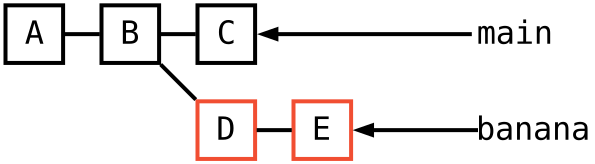 之后
之后 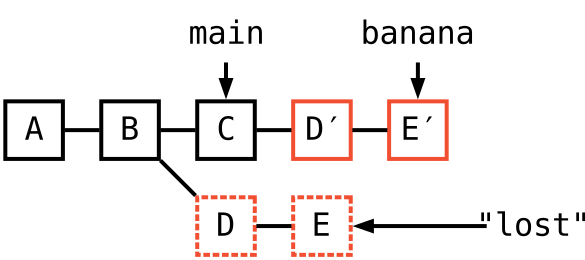
使用合并(merge)合并
git switch main git merge banana之前 之后 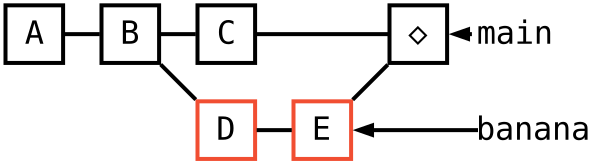
使用压合合并(squash merge)
git switch main git merge --squash banana git commit之前 之后 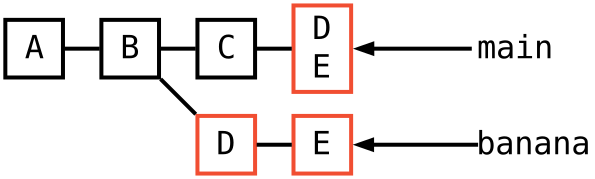
使分支与另一分支同步(又称“快进合并”)
git switch main git merge banana之前 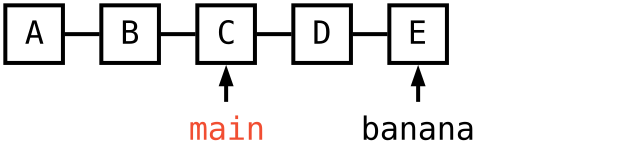 之后
之后 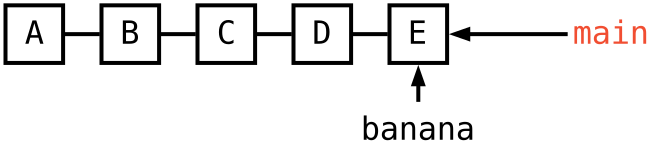
将某次提交复制到当前分支
git cherry-pick <commit> 之前 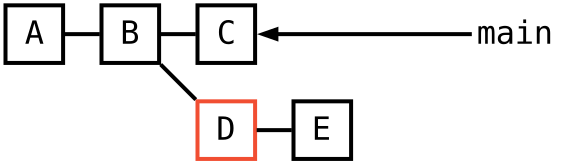 之后
之后 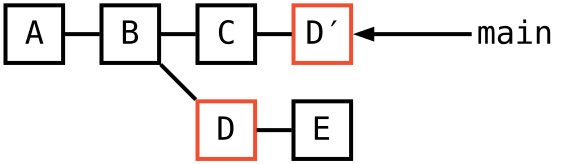
恢复旧文件
获取来自其他提交的某个文件版本
git checkout <commit> <file> 或 git restore <file> --source <commit>
添加远程仓库
git remote add <name> <url>
推送更改
将 main 分支推送到远程 origin
git push origin main
将当前分支推送到其远程“跟踪分支”
git push
推送之前从未推送过的分支
git push -u origin <name>
强制推送
git push --force-with-lease
推送标签
git push --tags
拉取更改
获取远程变更(但不合并到本地分支)
git fetch origin main
获取变更并变基当前分支
git pull --rebase
获取变更并合并到当前分支
git pull origin main 或 git pull
Git 配置
设置配置选项
git config user.name 'Your Name'
全局设置选项
git config --global ...
添加别名
git config alias.st status
查看所有可能的配置选项
man git-config
重要文件
本地 Git 配置
.git/config
全局 Git 配置
~/.gitconfig
忽略文件列表
.gitignore